HSBC is one of the Big Four UK banks. Millions of people and businesses bank with them. Their PDF statements look like they were designed in the 1980s - because they probably were.

When you're building a bank statement parser, HSBC is one of the harder ones to get right. Here's why.
The Mainframe Legacy
HSBC statements have that distinctive look - fixed-width fonts, rigid layouts, text that doesn't quite line up. It's the telltale sign of a mainframe system that's been generating these documents for decades.
Modern banks like Starling or Monzo produce clean, well-structured PDFs. HSBC produces something that looks like it was printed on a dot matrix printer and then scanned.
The Summary Problem
HSBC statements include an Account Summary section, which sounds useful:
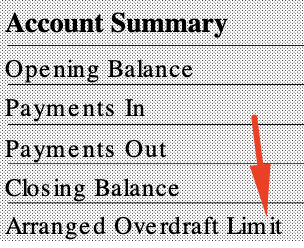
Opening Balance. Payments In. Payments Out. Closing Balance. Arranged Overdraft Limit.
The problem? The text doesn't align properly. Labels and values aren't in consistent columns. What looks structured to a human is chaos to a parser. Generic PDF extraction tools pull out the text but can't reliably match values to their labels.
No Running Balances
Most bank statements show a running balance after each transaction. Barclays does this. NatWest does this. It's useful for verification - you can check that each transaction correctly adds or subtracts from the previous balance.
HSBC doesn't do this. You get a starting balance, a list of transactions, and a closing balance. That's it.
For AI-based extraction, this is a problem. Without running balances, there's no way to verify each transaction was extracted correctly. You can check the totals at the end, but if something's wrong in the middle, you won't know which transaction caused it.
The Mysterious "D" Suffix
Here's the one that trips up most tools, including ChatGPT and other AI systems.
When an HSBC account is overdrawn, they don't show a negative number. Instead, they append a "D" after the amount:

See that "D" after the balance? That's not decoration. It means debit - the account is overdrawn. Without it, you'd think that's a positive balance. It's not.
The D isn't even properly aligned with the balance column. It sits slightly offset, almost like an afterthought.
If your parser doesn't know about this convention, it will happily report that balance as positive. Multiply that error across a business statement with hundreds of transactions, and you've got serious problems.
Why This Matters
If you're processing one or two personal statements, these quirks are annoying but manageable. You can eyeball the output and fix obvious errors.
But if you're a lender reviewing hundreds of business statements, or an accountant processing client documents, you need extraction that handles these edge cases automatically. Every time. Across hundreds of pages.
That's what we built UK Statement Converter to do. We've handled enough HSBC statements to know where the bodies are buried. The misaligned summaries. The missing running balances. The D suffix on overdrafts.
It's not glamorous work. But it's the difference between a tool that works on demo documents and one that works on real statements from real banks.
Try It With Your HSBC Statement
Upload an HSBC statement and see the difference. First conversion free.
Convert a Statement